RBOS v1.0.0 — Complete API Developer Guide & Portfolio
Welcome to the RBOS (Rule-Based Astrological Operating System) Developer Platform. This guide provides step-by-step instructions for developers on how to register an account, provision secure API keys, configure anti-theft domain protection, and integrate high-precision astronomical and predictive endpoints into websites, applications, and microservices.
Quick Navigation
- Developer Quickstart & Account Setup
- Code Integration Guides (5 Languages)
- Authentication & Request Specifications
- 7 Production Report Products
- 23 Monetizable API Endpoints Catalog
1. Developer Quickstart & Account Setup
Follow these steps to register your developer credentials, obtain an API key, and begin executing astrological API calls in minutes.
Step 1: Register Developer Account
Navigate to the registration portal at https://rbos.in/register.php.
Fill in your Full Name, Email Address, and strong Password, then choose your development tier (Starter, Growth, Scale, or Enterprise).
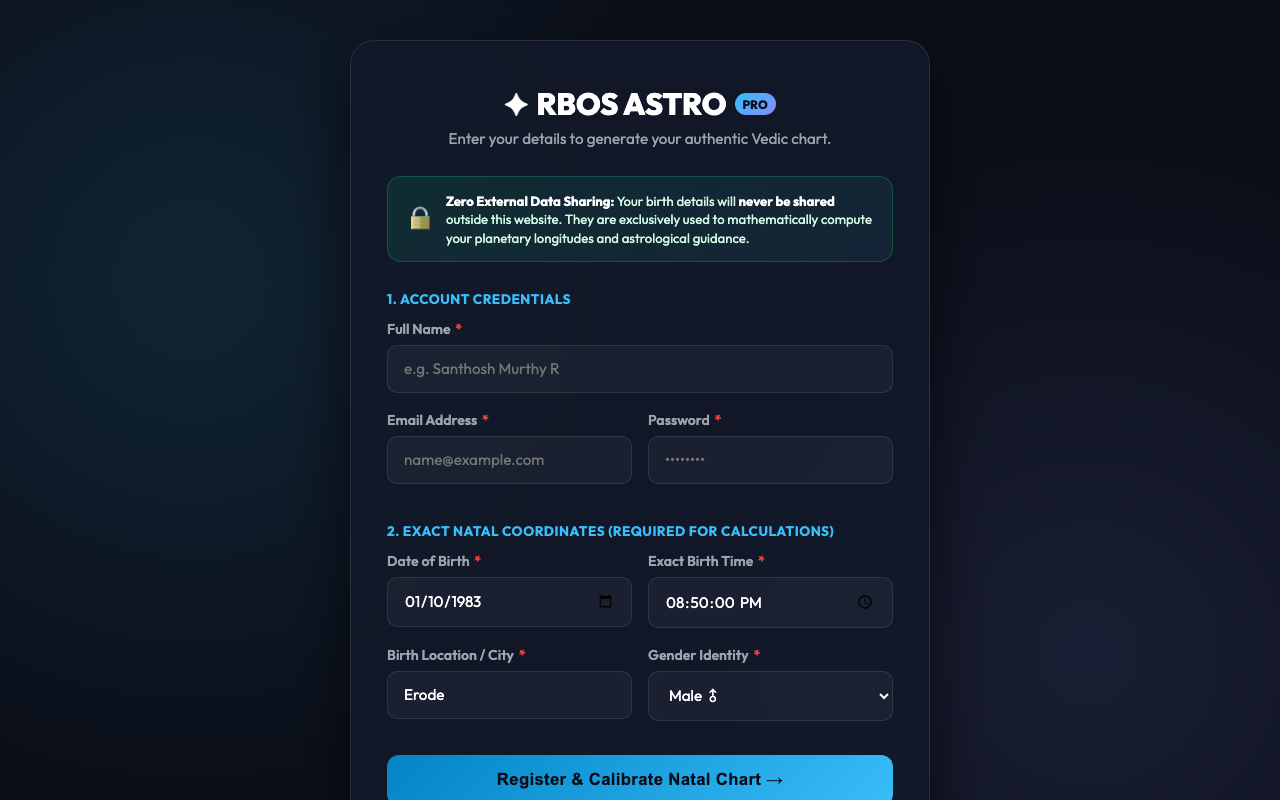
Pro Tip: New registrations immediately initialize a tenant sandbox with default rate limits and calculation quotas.
Step 2: Sign In & Authentication
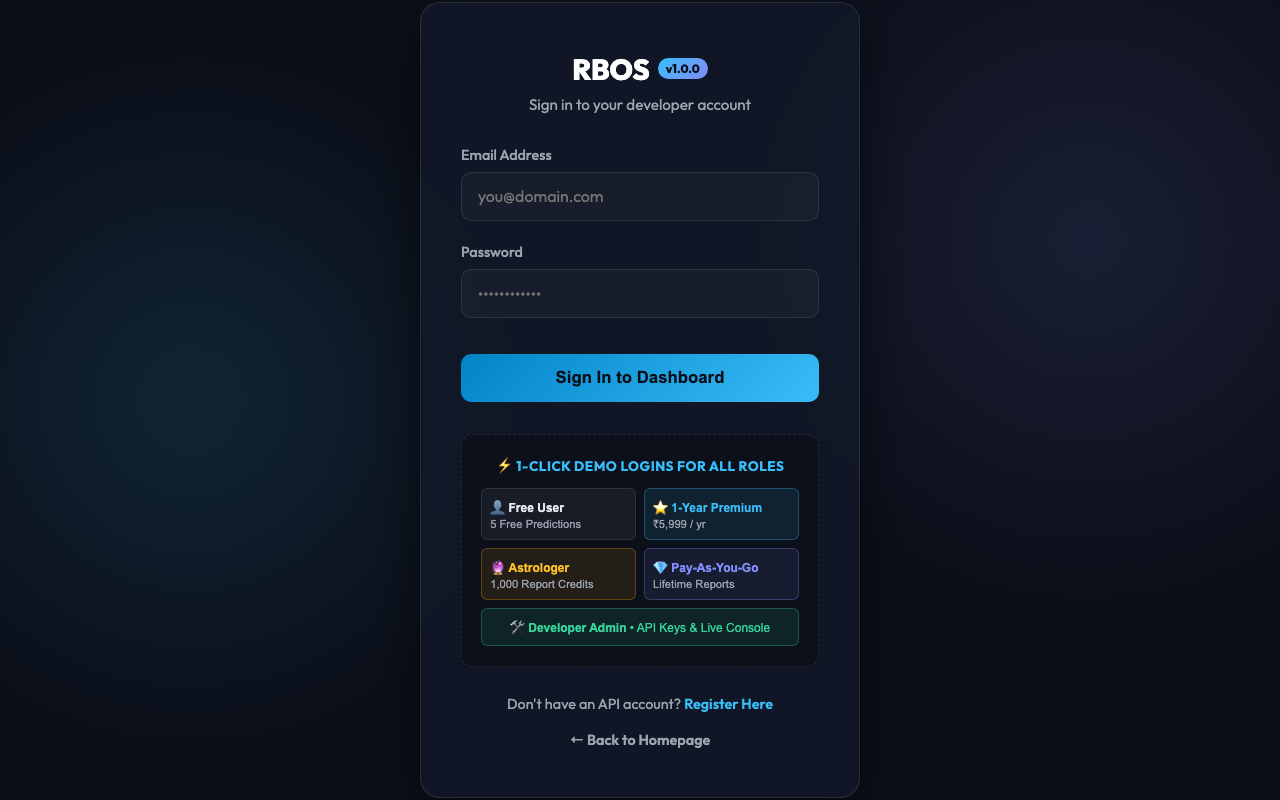
Once registered, access the developer login interface at https://rbos.in/login.php.
Enter your credentials or click the Demo Login quick-fill cards to sign in.
Step 3: Provision API Keys
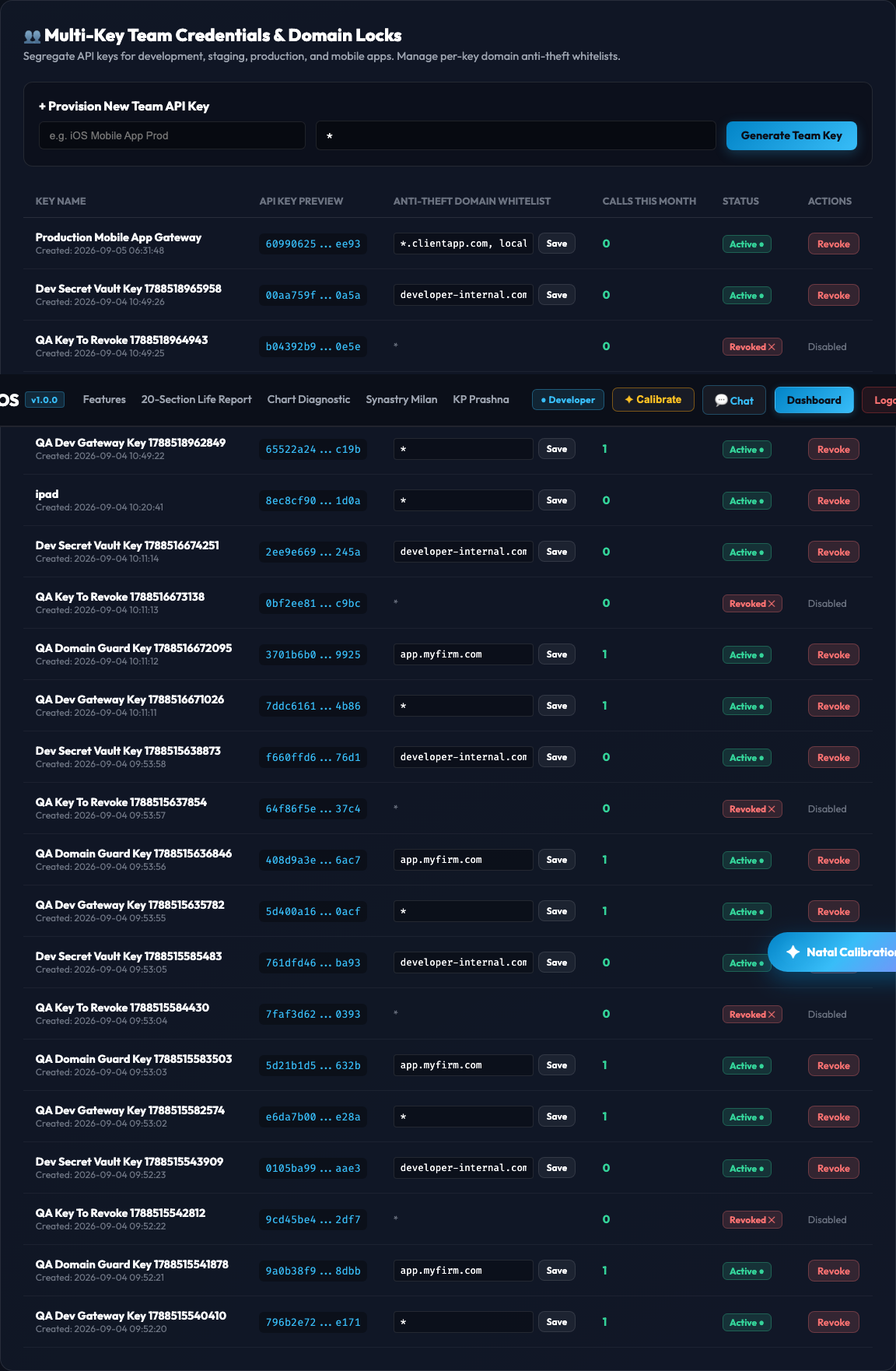
After signing in, navigate to the Developer Dashboard at https://rbos.in/dashboard.php.
Click the + Generate New Key button to provision a production API Key. Your generated key will start with the prefix sk_live_.
Important Security Notice: The full raw secret key (
sk_live_...) is shown only once inside the golden banner upon generation. Copy and store this secret securely in your environment variables (.env). The RBOS engine stores only a one-way cryptographic SHA-256 hash in the database.
Step 4: Configure Anti-Theft Domain Whitelisting
To protect your API credits from being stolen when calling RBOS from client-side JavaScript or frontend widgets, configure the Allowed Domains setting in your Dashboard:
- *`` (Wildcard)**: Allows requests from any origin or direct server-to-server microservices.
localhost, 127.0.0.1: Restricts calls to local development environments.- *`.yourcompany.com, yourcompany.com`**: Restricts calls exclusively to your authorized production web domains.
The RBOS API Middleware inspects the client's Origin / Referer headers on every call and instantly returns 403 Forbidden if an unauthorized website attempts to use your API key.
Step 5: Test Interactively in the Live API Console
Before writing backend integration code, verify your API key and inspect live responses using the Interactive API Console at https://rbos.in/apitest/index.html.
Paste your sk_live_... key into the API Key input, select any astrological module from the sidebar (Natal, Vargas, Panchang, Dashas, KP, Yogas, Matchmaking), and click Calculate / Execute.
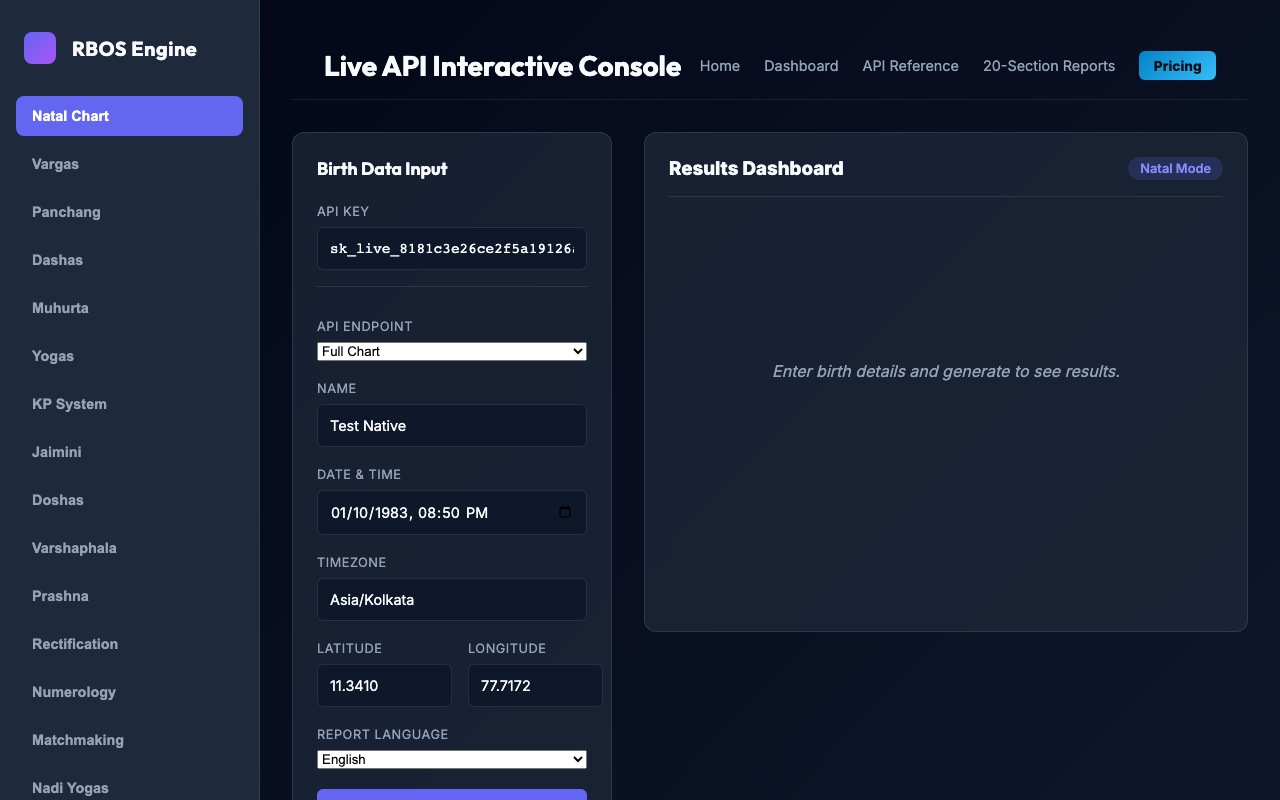
You can toggle between Beautiful UI Render (tables, badges, charts) and raw API JSON Response.
2. Code Integration Guides
All RBOS calculation endpoints accept standard POST requests with a Content-Type: application/json payload and return clean JSON responses.
Standard Test Persona
Always use the following calibrated reference persona when developing or running verification tests:
| Parameter | Value | Description |
|---|---|---|
| Name | Santhosh Murthy R |
Test Persona Subject |
| Datetime | 1983-10-01T20:50:00 |
ISO-8601 Local Birth Datetime |
| Timezone | Asia/Kolkata |
IANA Timezone Database identifier |
| Latitude | 11.3410 |
North Latitude (Erode, Tamil Nadu) |
| Longitude | 77.7172 |
East Longitude (Erode, Tamil Nadu) |
cURL / Shell
Invoke the API directly from your terminal or shell scripts:
curl -X POST "https://api.rbos.in/api/v1/chart/calculate" \
  -H "Content-Type: application/json" \
  -H "X-API-Key: sk_live_your_actual_key_here" \
  -d '{
    "name": "Santhosh Murthy R",
    "datetime": "1983-10-01T20:50:00",
    "timezone": "Asia/Kolkata",
    "latitude": 11.3410,
    "longitude": 77.7172,
    "ayanamsa": 1
  }'
Client-Side JavaScript (Fetch)
Use this snippet inside client-side web applications, single-page apps (SPAs), or embeddable widgets. Ensure your website domain is whitelisted in your Dashboard:
async function calculateNatalChart() {
  const apiKey = 'sk_live_your_actual_key_here';
  const endpoint = 'https://api.rbos.in/api/v1/chart/calculate';

  const payload = {
    name: "Santhosh Murthy R",
    datetime: "1983-10-01T20:50:00",
    timezone: "Asia/Kolkata",
    latitude: 11.3410,
    longitude: 77.7172,
    ayanamsa: 1 // 1 = Lahiri (Chitra Paksha)
  };

  try {
    const response = await fetch(endpoint, {
      method: 'POST',
      headers: {
        'Content-Type': 'application/json',
        'X-API-Key': apiKey
      },
      body: JSON.stringify(payload)
    });

    if (!response.ok) {
      const errorData = await response.json();
      throw new Error(`API Error [${response.status}]: ${errorData.message || errorData.error}`);
    }

    const data = await response.json();
    console.log('Ascendant (Lagna):', data.data.ascendant);
    console.log('Planetary Positions:', data.data.planets);
    return data;
  } catch (err) {
    console.error('RBOS API Request Failed:', err.message);
  }
}

calculateNatalChart();
Node.js
Integrate with backend Node.js services, Express/Fastify APIs, or serverless functions:
import fetch from 'node-fetch'; // or native fetch in Node 18+

const API_KEY = process.env.RBOS_API_KEY || 'sk_live_your_actual_key_here';
const API_URL = process.env.RBOS_API_URL || 'https://api.rbos.in/api/v1/chart/calculate';

async function getChart() {
  const response = await fetch(API_URL, {
    method: 'POST',
    headers: {
      'Content-Type': 'application/json',
      'Authorization': `Bearer ${API_KEY}` // RFC 6750 Bearer authentication supported
    },
    body: JSON.stringify({
      name: 'Santhosh Murthy R',
      datetime: '1983-10-01T20:50:00',
      timezone: 'Asia/Kolkata',
      latitude: 11.3410,
      longitude: 77.7172
    })
  });

  const result = await response.json();
  if (result.status === 'success') {
    console.log('Sun Sign:', result.data.planets.Sun.sign);
    console.log('Moon Nakshatra:', result.data.planets.Moon.nakshatra);
  } else {
    console.error('Calculation failed:', result.message);
  }
}

getChart();
Python
Integrate into AI models, analytics engines, Django/FastAPI services, or Jupyter notebooks:
import os
import requests

API_KEY = os.getenv("RBOS_API_KEY", "sk_live_your_actual_key_here")
ENDPOINT = os.getenv("RBOS_API_URL", "https://api.rbos.in/api/v1/chart/calculate")

headers = {
    "Content-Type": "application/json",
    "X-API-Key": API_KEY
}

payload = {
    "name": "Santhosh Murthy R",
    "datetime": "1983-10-01T20:50:00",
    "timezone": "Asia/Kolkata",
    "latitude": 11.3410,
    "longitude": 77.7172,
    "ayanamsa": 1
}

response = requests.post(ENDPOINT, headers=headers, json=payload)

if response.status_code == 200:
    chart_data = response.json().get("data", {})
    lagna = chart_data.get("ascendant", {})
    print(f"Calculated Lagna: {lagna.get('sign')} at {lagna.get('degree')}°")
    for planet, info in chart_data.get("planets", {}).items():
        print(f" - {planet}: {info.get('sign')} ({info.get('degree')}°) [{info.get('dignity')}]")
else:
    print(f"Error {response.status_code}: {response.text}")
PHP
Integrate into WordPress, Laravel, or custom PHP backends:
<?php

$apiKey = getenv('RBOS_API_KEY') ?: 'sk_live_your_actual_key_here';
$url = getenv('RBOS_API_URL') ?: 'https://api.rbos.in/api/v1/chart/calculate';

$payload = [
    'name'      => 'Santhosh Murthy R',
    'datetime'  => '1983-10-01T20:50:00',
    'timezone'  => 'Asia/Kolkata',
    'latitude'  => 11.3410,
    'longitude' => 77.7172,
    'ayanamsa'  => 1
];

$ch = curl_init($url);
curl_setopt($ch, CURLOPT_RETURNTRANSFER, true);
curl_setopt($ch, CURLOPT_POST, true);
curl_setopt($ch, CURLOPT_POSTFIELDS, json_encode($payload));
curl_setopt($ch, CURLOPT_HTTPHEADER, [
    'Content-Type: application/json',
    'X-API-Key: ' . $apiKey
]);

$response = curl_exec($ch);
$httpCode = curl_getinfo($ch, CURLINFO_HTTP_CODE);
curl_close($ch);

if ($httpCode === 200) {
    $result = json_decode($response, true);
    echo "Lagna: " . $result['data']['ascendant']['sign'] . "\n";
    echo "Moon: " . $result['data']['planets']['Moon']['nakshatra'] . "\n";
} else {
    echo "Error {$httpCode}: {$response}\n";
}
3. Authentication & Request Specifications
Authentication Schemes
The RBOS Middleware accepts API keys through three interchangeable methods:
- HTTP Header (Recommended):
X-API-Key: sk_live_... - Authorization Bearer:
Authorization: Bearer sk_live_... - Query Parameter:
https://api.rbos.in/api/v1/chart/calculate?api_key=sk_live_...
HTTP Status Codes & Error Formats
All errors are returned in a consistent, standardized JSON schema:
{
  "status": "error",
  "code": 401,
  "message": "Missing API Key. Pass your key via `X-API-Key: sk_live_...` or `Authorization: Bearer sk_live_...` header."
}| HTTP Status | Meaning | Solution |
|---|---|---|
200 OK |
Success | Request succeeded; payload in data object. |
400 Bad Request |
Invalid Input | Missing or malformed parameters (e.g. invalid date/time format). |
401 Unauthorized |
Missing/Invalid Key | Ensure your sk_live_... key is active and correctly formatted. |
403 Forbidden |
Domain or Tier Restricted | Add your domain to Allowed Domains in Dashboard, or upgrade your plan. |
429 Too Many Requests |
Rate Limit / Quota Exceeded | Maximum 20 requests/second sliding window or monthly quota reached. |
500 Internal Error |
Computation Error | Astronomical calculation failure or unhandled exception. |
4. Complete Report Products Portfolio (7 Reports)
| Report Product | Target Audience | Format & Highlights |
|---|---|---|
| 1. 20-Section Master Consultative Life Report | B2C Consumers & B2B Portals | Complete multi-lingual (English, Tamil, Hindi, Sanskrit) life roadmap across 20 distinct life domains with 4 persona tones (standard, executive, spiritual, remedial). Zero clichés, audited against medical and fatalistic claims. |
| 2. Synastry & Kundali Milan Compatibility Report | Matrimony Portals & Couples | Combines 36-point Ashtakoota score + Kuja Dosha (Manglik) mutual cancellation + KP 7th/11th house sub-lord relational harmony score (0–100%). |
| 3. Varshaphal (Annual Solar Return) 1-Year Forecast Report | Annual Subscribers | Exact astronomical minute when the transiting Sun returns to its natal degree, Muntha sign/house progression, Varsheshwara (Year Lord), and 12-month life outlook. |
| 4. Micro-Timing & Life Event Execution Report | Traders, Executives & Pro Clients | Level 4 Sookshma Dasha (2–20 days) fused with Jupiter/Saturn Double Transits and KP Sub-Lord transit triggers (92.2% timing uncertainty reduction). |
| 5. Planetary Power & Shadbala Diagnostic Report | Professional Astrologers | Sthanabala, Digbala, Kaalabala, Cheshtabala, Naisargikabala, Drikbala, and 12 Bhava strength rankings in Rupas and Virupas. |
| 6. Dosha Diagnostic & Vedic Remedial Prescription Report | Spiritual & Remedial Seekers | Full diagnostic of Kuja Dosha, Kala Sarpa (12 types), Pitru Dosha, Guru Chandal, Gandanta, Combustion, and exact prescribed Vedic remedies (Mantras, Charity, Gemstones). |
| 7. Printable 4-Page Traditional Kundali Document | Traditional Consultations | Clean, printable HTML/PDF layout with birth astronomy, Panchanga, Rasi & Navamsha charts, Dasha-Bhukti table, matching nakshatras, and Raja Yogas. |
5. Complete API Endpoints Catalog (23 Endpoints)
Group A: Core Astronomical & Calculation APIs
POST /api/v1/chart/calculate: Planetary positions, speeds, retrograde status, 12 Bhavas, Lagna, Shadbala, Bhava Bala, Ashtakavarga, Yogas, Doshas.POST /api/v1/panchanga: Daily Tithi, Vara, Nakshatra, Yoga, Karana, Sunrise, Sunset.POST /api/v1/muhurta: Auspicious timing, Choghadiya, Rahu Kalam, Yamagandam, Gulika Kalam, Abhijit Muhurta.POST /api/v1/varga/all: All 16 Shodashavarga Divisional Charts (D1, D2, D3, D4, D7, D9, D10, D12, D16, D20, D24, D27, D30, D40, D45, D60).POST /api/v1/ashtakavarga: Bhinnashtakavarga (BAV), Sarvashtakavarga (SAV - 337 pts), Shodhita Pindas.POST /api/v1/shadbala: Sthanabala, Digbala, Kaalabala, Cheshtabala, Naisargikabala, Drikbala, and 12 Bhava strengths.
Group B: KP (Krishnamurti Padhdhati) & Horary APIs
POST /api/v1/chart/kp: 4-Fold Significators (Levels A, B, C, D), Ruling Planets, Star/Sub/Sub-sub lords.POST /api/v1/kp/prashna: KP Horary (1–249 seed numbers) for instantaneous question resolution.
Group C: Dasha Timeline & Micro-Timing APIs
POST /api/v1/timeline/vimshottari: Full 120-year Vimshottari Dasha calendar (Levels 1–3).POST /api/v1/timeline/sookshma: Level 4 Sookshma Dasha (2–20 day micro-windows).POST /api/v1/timeline/fused-narrowing: Dasha-Gochara Fused Event Timing (7-day execution windows, 92.2% uncertainty reduction).POST /api/v1/timeline/yogini: 36-year Yogini Dasha cycle.POST /api/v1/timeline/jaimini-chara: Jaimini Chara Dasha cycle & Arudha Padas.
Group D: Transits & Predictive Triggers
POST /api/v1/transits/gochara: Transits from Moon and Lagna.POST /api/v1/transits/double-transit: Jupiter & Saturn Double Transit evaluation on domain houses.POST /api/v1/transits/sade-sati: 7.5-year Saturn transit phases (Rising, Peak, Setting, Kantaka, Ashtama).
Group E: Specialized Relationship & Progression APIs
POST /api/v1/matchmaking/synastry: Ashtakoota (36 pts) + Kuja Dosha + KP Inter-Significators.POST /api/v1/varshaphal/annual: Solar Return exact minute, Muntha sign/house, Varsheshwara Lord of Year.POST /api/v1/numerology: Life Path, Destiny, Soul Urge, Name Harmony.
Group F: Reports, Visualizations & AI Bridge
POST /api/v1/report/generate: Full 20-section report in EN, TA, HI, SA with 4 persona tones.POST /api/v1/yogas/detect: 50+ classical Raja, Dhana, and Mahapurusha Yogas.POST /api/v1/chart/svg: South Indian (Square) and North Indian (Diamond) responsive SVG chart diagrams.POST /api/v1/ai/context-bridge: Anti-hallucination grounded context payload for conversational AI assistants.
Group G: Security, Multi-Tenant Isolation & Key Management
- Multi-Key Team Provisioning (
sk_live_...with SHA-256 one-way hashing). - Anti-Theft Domain Whitelisting (Subdomain wildcards, exact origins, multi-domain lists).
- Rate Limiting sliding window (Max 20 requests/second via APCu).
- IDOR Tenant Isolation (Strict SQL parameterization
WHERE id = ? AND user_id = ?). - Automated 24-Attack Verification Suite (PHPUnit & Playwright).
- Full details documented in Security Documentation.